Gym Website Design Checklist: 15 Must-Haves for Fitness Sites

Building or redesigning a gym website can feel overwhelming. There are a hundred decisions to make: colours, photos, pages, plugins, booking tools, forms. It’s easy to spend weeks on the look of the homepage and forget the things that actually make people sign up.

This checklist cuts through the noise. It’s the same list we use when we plan and audit fitness websites, organised page by page so you can tick items off as you go. Whether you’re starting from scratch, briefing a designer or reviewing your current site, use it to make sure nothing important slips through the cracks.

How to use this checklist: go through each section with your website open on your phone (most of your visitors will be on mobile). Mark each item as done, needs work or missing. Then fix the “missing” items first, starting with the homepage and booking flow.

Section 1: Strategy Before Design

Before you choose a single colour, get clear on the basics. Design decisions are much easier when the strategy is set.

  • Define your ideal member. Are you serving busy professionals, college students, women looking for a comfortable space, serious lifters or seniors? Your words, photos and offers should speak to them.
  • Pick one primary goal for the website. For most gyms, it’s booking a free trial or a first visit. Every page should lead to it.
  • Choose your entry offer. A free day pass, a free week, a complimentary personal training session or a discounted first month. Make it specific.
  • List your key services. Gym floor, personal training, group classes, CrossFit, yoga, Zumba, nutrition coaching, physiotherapy and so on.
  • Identify your differentiators. What makes you different from the three nearest gyms? Women-only hours, 24/7 access, certified coaches, premium equipment, steam room, parking?
  • Research competitors. Look at the websites of nearby gyms. Note what they do well and where they fall short.

Section 2: Branding and Visual Identity

Your website should feel like your gym. When someone walks in after browsing your site, nothing should feel surprising.

  • Logo in high resolution, with a version that works on dark and light backgrounds
  • A consistent colour palette of two or three main colours plus neutrals
  • Readable fonts: one for headings and one for body text, at a comfortable size on mobile
  • Real photography of your space, trainers and members, shot in good light
  • A tone of voice that matches your brand, whether that’s energetic, calm, premium or community-focused
  • Consistent button styles so visitors instantly recognise what’s clickable

Tip: if you can’t afford a professional photoshoot, a modern smartphone, natural light and a clean, tidy gym will still beat stock photos. Visitors want to see the real place.

Section 3: Homepage Checklist

Your homepage is where most visitors form their first impression. Make every section earn its place.

Above the fold (the first screen)

  • A clear headline that says what you are and where you are
  • A short supporting line that highlights your main benefit or offer
  • One primary call-to-action button, such as “Book Your Free Trial”
  • A secondary action, such as “WhatsApp Us” or “Call Now”
  • A strong, real image or short looping video of your gym

Below the fold

  • A quick overview of your main services with links to each service page
  • Key differentiators presented as short, scannable points with icons
  • Social proof: Google rating, review snippets and member transformation stories
  • Trainer highlights with photos and specialities
  • A preview of pricing or plans, with a link to the full pricing page
  • A photo gallery or short video tour
  • A location section with map, address, hours and parking information
  • A final call to action before the footer

Section 4: Navigation and Structure

Good navigation is invisible. Visitors should never have to think about where to click.

  • Five to seven main menu items at most (for example: Home, Services, Classes, Pricing, Trainers, About, Contact)
  • A prominent “Free Trial” button in the header, separate from the menu items
  • A sticky header or sticky bottom bar on mobile with call and WhatsApp buttons
  • Clear, descriptive menu labels rather than clever ones
  • A footer with contact details, hours, social links, quick links and legal pages
  • No broken links or empty “coming soon” pages

Section 5: Services and Programme Pages

Each major service deserves its own page. These pages help you rank for specific searches like “personal trainer in Patna” and help visitors understand exactly what they’ll get.

For every service page, check that you have:

  • A specific headline, such as “Personal Training for Weight Loss and Strength”
  • Who the programme is for and what results to expect
  • How it works: session length, frequency, what happens in the first session
  • Pricing or a starting price
  • Trainer or coach associated with the programme
  • Testimonials specific to that service
  • Frequently asked questions
  • A clear call to action at the top and bottom

Section 6: Class Schedule

If you run group classes, the schedule is one of your most visited pages.

  • A schedule that’s easy to read on mobile (avoid tiny, wide tables)
  • Filters by day, class type or trainer if you have many classes
  • Class descriptions with intensity level and duration
  • The option to book a spot online, or at least a clear way to reserve
  • Accurate, up-to-date information (an outdated schedule damages trust quickly)
  • Notes about holidays or special events

Section 7: Pricing Page

Pricing is a top reason people visit gym websites. Make it clear and honest.

  • Plans listed with prices or “starting from” prices
  • What’s included in each plan, written as simple bullet points
  • Duration options: monthly, quarterly, half-yearly, annual
  • Joining fees, if any, clearly stated
  • Current offers with an end date
  • Answers to common objections, such as freezing membership, refunds and couple discounts
  • A call to action on each plan, plus a free trial option for people not ready to commit

Section 8: Trainers and About Page

People buy from people. Your coaches and your story are a big part of why someone chooses you.

  • Individual trainer profiles with a professional photo
  • Certifications, experience and specialities
  • A short personal line that makes each trainer approachable
  • Your gym’s story: why it was started and what you believe in
  • Photos of your team and community events
  • Any awards, media mentions or partnerships

Section 9: Booking, Forms and Lead Capture

This is where visitors become leads. Small details here make a big difference.

  • Trial booking form with as few fields as possible (name, phone, preferred time)
  • Form works smoothly on mobile, with the correct keyboard for phone numbers
  • Clear confirmation message after submission, plus an automatic SMS, email or WhatsApp
  • Click-to-call and click-to-WhatsApp buttons on every page
  • Online membership purchase or payment links, if you offer them
  • Leads routed instantly to the person responsible for follow-up
  • A simple process at the front desk to follow up with every lead within a few hours

Section 10: Mobile Experience

Test everything on a real phone, not just by resizing your desktop browser.

  • Text readable without zooming (body text around 16px or larger)
  • Buttons large enough to tap comfortably with a thumb
  • No horizontal scrolling
  • Images that resize properly and don’t slow the page down
  • Pop-ups that are easy to close and don’t block the whole screen
  • Menu that opens and closes smoothly

Section 11: Speed and Performance

Slow websites lose visitors and rank lower in search results.

  • Run your homepage and key pages through Google PageSpeed Insights
  • Compress and resize images; use modern formats such as WebP
  • Avoid heavy sliders and auto-playing background videos on mobile
  • Use a lightweight theme and only the plugins you need
  • Enable caching and use a reliable hosting provider
  • Lazy-load images and embedded videos further down the page

Section 12: SEO Essentials

You want people searching for gyms in your area to find you.

  • Unique page titles and meta descriptions for every page, including your location
  • One clear H1 heading per page
  • Your gym name, address and phone number written consistently across the site and Google Business Profile
  • An embedded Google Map on your contact page
  • Local business schema markup
  • Descriptive image file names and alt text
  • A blog or resources section with helpful fitness content
  • XML sitemap submitted to Google Search Console

Section 13: Trust, Legal and Accessibility

These items are easy to overlook but important for credibility.

  • Privacy policy, terms and conditions, and refund or cancellation policy
  • Secure website (HTTPS) with a valid SSL certificate
  • Cookie notice if you use tracking tools that require one
  • Sufficient colour contrast so text is easy to read
  • Alt text on images for screen readers
  • Visible contact information, so visitors know a real business is behind the site

Section 14: Tracking and Analytics

Without data, you’re guessing.

  • Google Analytics 4 installed and verified
  • Conversion events for form submissions, call clicks, WhatsApp clicks and purchases
  • Google Search Console connected
  • Meta Pixel installed if you run Facebook or Instagram ads
  • A simple monthly report: visitors, leads, conversion rate and new members

Section 15: Launch and Maintenance

A website is never really “finished”. Plan for ongoing care.

  • Test every form, button and link before launch
  • Check the site on Android and iPhone, and on different browsers
  • Set up regular backups
  • Keep themes and plugins updated
  • Update offers, schedules and photos at least once a month
  • Review analytics monthly and make one improvement at a time

Common Mistakes to Avoid

Even with a checklist, a few mistakes show up again and again on gym websites:

  1. Designing for the owner, not the member. It’s your gym, but the website is for prospects. Focus on their questions and concerns.
  2. Hiding the price. It sends visitors to competitors who show theirs.
  3. Using only stock photos. People can tell, and it reduces trust.
  4. Too many calls to action. “Join now”, “Download our app”, “Follow us”, “Subscribe” and “Book a tour” all on one screen creates confusion. Choose one main action.
  5. Never updating the site. Old offers, past events and outdated schedules make a gym look neglected.
  6. No follow-up system. A great website that generates leads nobody calls back is wasted effort.

Frequently Asked Questions

How many pages does a gym website need?

Most gyms do well with a homepage, a page for each main service, a class schedule, pricing, trainers or about, contact and a blog. Start with the essentials and add pages as you grow.

Should my gym website have online payments?

If you sell memberships, class packs or personal training packages, online payment reduces friction and lets people commit while they’re motivated. At minimum, offer an easy way to book a trial online.

Which platform is best for a gym website?

It depends on your budget, how often you’ll update content, and the integrations you need. Read our comparison of WordPress vs Webflow vs custom gym websites to choose the right fit.

How often should I redesign my gym website?

A full redesign every three to four years is common, but small improvements should happen every month. Regular updates are more effective than occasional big overhauls.

Related reading

Get a Free Gym Website Audit

Going through this checklist will likely show you a few gaps. That’s normal, and fixing even a handful of them can noticeably increase your trial bookings.

If you’d rather have an expert do the review for you, BananaBlocks Solutions offers website audits and design for gyms and fitness studios. We’ll go through your site against this checklist, prioritise the changes that will bring in the most members, and help you implement them. Contact our team to get started.
WordPress vs Webflow vs Custom Gym Website: Which to Choose?

Your gym website is not just an online brochure. It is one of your most important marketing assets. It helps people discover your gym, understand your classes, trust your trainers, check your offers, and take action through a call, WhatsApp message, trial booking, or membership inquiry. But before building a gym website, one big question comes up:

Should you choose WordPress, Webflow, or a custom-built gym website?

The right answer depends on your goals, budget, content needs, and how serious you are about using your website for marketing and lead generation.

Why Your Gym Website Platform Matters

A gym website needs to do more than look good. It should load fast, work perfectly on mobile, support local SEO, capture leads, and make it easy for visitors to take action. Google also recommends strong Core Web Vitals because they measure real user experience such as loading performance, interactivity, and visual stability.

For gyms, this matters because most potential members are searching from their phones. They may compare multiple gyms before deciding where to book a trial, visit, or message. A slow, confusing, or outdated website can easily lose that lead.

Option 1: WordPress Gym Website

WordPress is one of the most popular website platforms in the world. As of July 2026, W3Techs reports that WordPress is used by around 41.5% of all websites and has about 59.2% CMS market share among websites using a known CMS.

For gym owners, WordPress can be a strong option because it is flexible, affordable, and widely supported.

Best For

WordPress is best for gyms that need a flexible website built for content, SEO, and future growth. It is ideal for fitness businesses that want to publish blogs, promote classes, showcase trainers, manage membership details, and keep expanding their online presence over time.

Pros of WordPress for Gyms

WordPress gives gym owners strong control over both content and SEO, which makes it a practical choice for long-term digital growth. You can create dedicated pages for each service your gym offers, such as personal training, group fitness classes, yoga, strength training, CrossFit, weight loss programs, nutrition coaching, or transformation challenges. This helps your website target more specific search terms and gives potential members a clear path to find the exact service they are interested in.

Another major advantage of WordPress is its blogging capability. Gyms can publish helpful content around fitness tips, workout routines, class benefits, trainer advice, weight loss guidance, and local fitness topics. Over time, this content can support local SEO, build trust with visitors, and bring more organic traffic to your website.

WordPress also supports a wide range of integrations through plugins and third-party tools. You can connect contact forms, WhatsApp buttons, booking systems, CRM platforms, email marketing tools, analytics, payment gateways, SEO plugins, live chat, and lead capture systems. This makes it easier to turn a basic gym website into a complete marketing and inquiry-generation system.

It is also easier to hand over a WordPress website to a gym owner, receptionist, or marketing team after setup. Once the structure is built properly, adding blog posts, updating class schedules, changing offers, editing membership details, uploading trainer profiles, or publishing new landing pages can be managed without needing a developer for every small change.

For gyms that want a website they can keep improving month after month, WordPress offers a strong balance of flexibility, control, and scalability.

Cons of WordPress for Gyms

The main downside is maintenance. WordPress websites need regular updates, plugin checks, security monitoring, backups, and performance optimization. If too many plugins are added, the site can become slower or harder to manage.

A WordPress gym website is only as good as the way it is built. A cheap template-based site may look okay at first but can become slow, generic, and difficult to scale.

Choose WordPress If

Choose WordPress if your gym wants a website that can grow with your marketing strategy. It is a strong choice if you plan to publish regular blogs, improve local SEO, create separate pages for different fitness services, update classes or offers easily, and manage content without depending on a developer for every small change.

For gyms focused on long-term visibility, content marketing, and steady lead generation, WordPress offers the flexibility to start simple and expand over time.

Option 2: Webflow Gym Website

Webflow is a modern visual website builder that is popular for premium design, clean layouts, and strong visual control. It is often used by designers and agencies that want creative freedom without building everything from scratch.

For gym brands that care about modern visuals, animations, and a premium feel, Webflow can be a very good option.

Best For

Webflow is best for gyms that want a stylish, premium, design-focused website with fewer technical maintenance needs.

Pros of Webflow for Gyms

Webflow gives excellent control over design. It is great for bold hero sections, smooth animations, modern layouts, class cards, trainer sections, transformation stories, and landing pages.

It also handles hosting in a more managed way, which means gym owners do not need to worry as much about plugin updates or server setup compared to WordPress.

For a premium fitness studio, boutique gym, yoga studio, or personal training brand, Webflow can help create a website that feels high-end and polished.

Cons of Webflow for Gyms

Webflow can become limiting if your gym needs complex backend features, advanced membership systems, custom dashboards, or deep integrations. It may also be harder for non-designers to edit compared to basic WordPress content editing.

Webflow can also cost more monthly depending on the plan and CMS needs. If your gym wants many dynamic pages, blogs, or custom workflows, the cost and complexity may increase.

Choose Webflow If

Choose Webflow if your gym wants a premium visual website, strong design quality, smooth animations, and a modern brand experience without heavy plugin maintenance.

Option 3: Custom Gym Website

A custom gym website is built specifically for your business needs, usually with modern technologies like Next.js, React, Laravel, or another custom stack.

This is the most powerful option when your gym needs more than a normal website.

Best For

A custom website is best for gyms, fitness chains, academies, or studios that need unique features, high performance, advanced lead systems, member portals, custom booking flows, CRM integration, or scalable digital products.

Pros of a Custom Gym Website

A custom website gives you full control. You can build exactly what your gym needs instead of adjusting your business around a template or plugin.

For example, you can create custom class booking, trainer directories, member dashboards, lead tracking, CRM automation, landing pages for ad campaigns, online programs, e-commerce, or location-based pages for multiple branches.

Custom websites can also be optimized for speed, security, and conversion from the start. This is important if you want your website to become a serious marketing engine, not just a digital brochure.

Cons of a Custom Gym Website

The main downside is cost and development time. A custom website usually requires a higher budget than a basic WordPress or Webflow site. It also needs a reliable developer or agency for updates and future improvements.

This option is not always necessary for a small gym that only needs a simple online presence.

Choose Custom If

Choose a custom gym website if you want a high-performance, scalable, unique website with custom features, automation, CRM workflows, and serious long-term marketing potential.

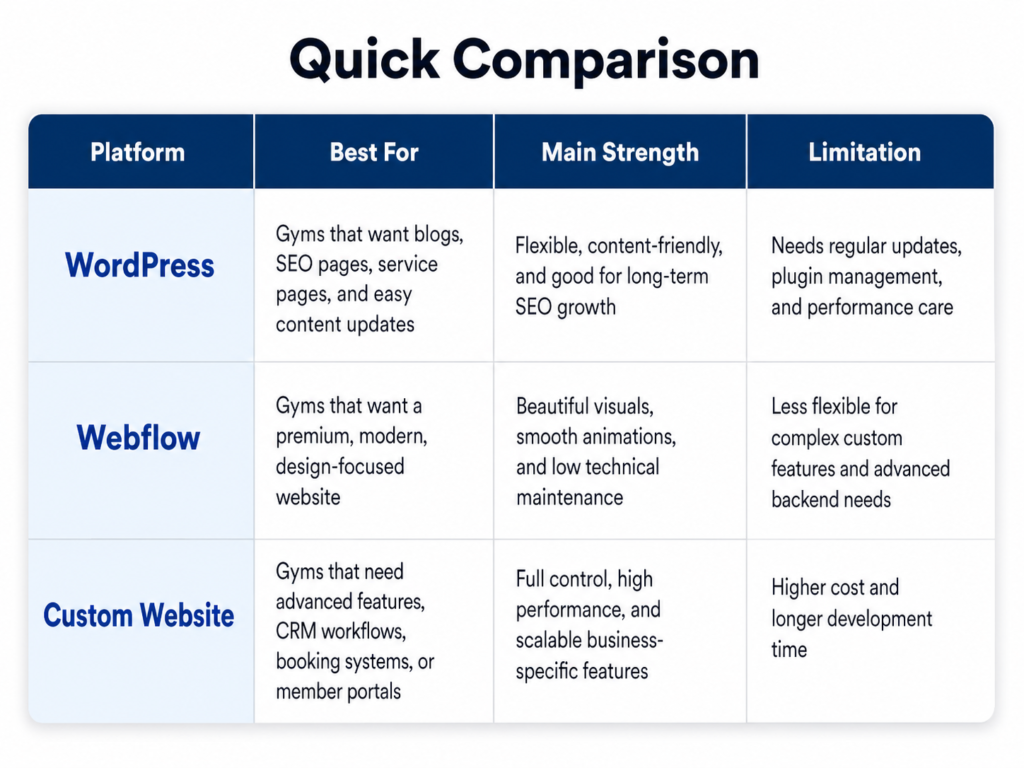
Quick Comparison

WordPress is best for SEO, blogs, content management, and flexible growth.

Webflow is best for premium design, smooth visuals, and modern landing pages.

Custom development is best for advanced features, performance, scalability, and full business-specific control.

Gym website platform and CRM comparison

Which One Should Gym Owners Choose?

If you are a small local gym and want a practical website with blogs, SEO, service pages, and lead forms, WordPress is usually the best starting point.

If you run a premium fitness studio and want your website to look modern, stylish, and high-end, Webflow can be a great choice.

If you want a serious digital growth system with CRM integration, custom booking, member portals, automation, landing pages, and scalable performance, a custom gym website is the strongest option.

Related reading

Final Recommendation

For most gym owners, the best choice depends on the stage of the business.

A new or growing gym can start with a well-built WordPress website.

A premium fitness brand can choose Webflow for a stronger design experience.

An ambitious gym owner who wants to take marketing to the next level should consider a custom-built website designed around leads, automation, SEO, and long-term growth.

Your website should not just exist online. It should help your gym attract visitors, convert leads, and grow memberships.

Not sure which platform fits your gym? Talk to the BananaBlocks team for a free recommendation, or see our gym website design and development service.

Apartment Landing Page Design That Drives Site Visits

Let’s cut to the chase. Most real estate landing pages are a mess. They are cluttered with too many buttons, bloated with generic “luxury living” AI-generated text, and completely miss the point of why the user clicked your ad in the first place.

Here at BananaBlocks Solutions Pvt Ltd, we build digital experiences that convert. If you are selling apartments, your landing page only has one job: getting the prospect to book a site visit. Not downloading a brochure. Not following you on Instagram. Just booking that visit.

Here is our blueprint for crafting an apartment landing page that cuts through the noise, builds instant trust, and turns passive scrollers into highly qualified walk-ins.

The Ultimate Objective: The Site Visit

Every single pixel, word, and image on your landing page must drive the user toward one action. Real estate is a high-ticket, high-consideration purchase. Nobody buys a house straight from a landing page, but they will book a tour if you convince them it is worth their Saturday afternoon.

Agency Tip: Remove all secondary navigation links. Hide your social media icons. Eliminate the “Subscribe to Newsletter” field. You are creating a funnel, not a Wikipedia page.

A Ruthless, Clear Information Hierarchy

A confused mind says no. Your landing page needs a logical flow that mirrors a buyer’s thought process. We recommend this exact hierarchy:

  • The Hook (Hero Section): A stunning, authentic video background or image with a sharp headline (e.g., “Wake Up to Unobstructed Sea Views in [Location]”).
  • The Vibe (Lifestyle & Amenities): What does life look like here? Keep it brief.
  • The Specs (Floor Plans & Pricing): Don’t hide the price. Tease the starting price and show clean layouts.
  • The Proof (Location & Connectivity): Map out the exact distance to top schools, tech parks, and hospitals.
  • The Edge (Peer Comparison): Show them why you win (more on this below).
  • The Close (The CTA): The final, frictionless form.

Real Visuals Only: Ban the “AI Slop”

Buyers are smart. They can spot an AI-generated rendering of a freakishly perfect family having a picnic from a mile away. When they see fake images, they assume a fake project.

To build genuine trust, you must use original site images and real video footage.

  • Use drone fly-throughs of the actual construction site or neighborhood.
  • Show real video testimonials from current buyers.
  • If the project is under construction, use high-quality architectural 3D renders based on actual floor plans, but blend them seamlessly with real-life drone footage of the surrounding views. Authenticity converts; AI slop bounces.

The Power of the Peer Comparison

Your buyers have ten tabs open comparing your apartment to other projects in the same pin code. Do the heavy lifting for them. A transparent, objective comparison table builds massive authority and trust.

FeatureYour Project (The Haven)Competitor ACompetitor B
Usable Carpet Area1,250 sq ft1,100 sq ft1,150 sq ft
Units per FloorOnly 4 (High Privacy)8 (Crowded)6 (Moderate)
Clubhouse Size25,000 sq ft10,000 sq ft15,000 sq ft
Green Space75% Open Area40% Open Area50% Open Area

When you lay out the facts, your project becomes the logical choice.

Copywriting Crafted by Humans, for Humans

ChatGPT is a great brainstorming tool, but if you copy-paste its output directly onto your landing page, you will sound like a robot reading a dictionary. “Experience the epitome of luxurious tranquility in the heart of the bustling metropolis” is lazy, invisible text.

Write with a scalpel. Highlight tangible benefits over vague features.

  • Instead of: “State-of-the-art security systems.”
  • Write: “Sleep soundly knowing your family is protected by 24/7 manned gates and biometric lobby access.”

Speak directly to your buyer’s pain points. Good copywriting makes the reader feel understood.

The Golden Rule: One Clear CTA at the Bottom

You’ve hooked them, showed them real visuals, proved your superiority with a comparison table, and charmed them with sharp copy. Now, it is time to close.

Place a single, highly visible form at the very end of the page. Do not ask for their life story.

  • Name
  • Phone Number
  • Preferred Visit Time (Dropdown)

Make the button text active and specific. Drop “Submit” and use “Book My Exclusive Site Visit Now”.

Speed Is Part of the Pitch

Most apartment leads come from Meta and Google ads, and almost all of them land on a phone. If your page takes five seconds to load because of a 20 MB hero video and an uncompressed brochure gallery, you’ve paid for a click that never sees your project.

  • Compress every render and photo, and serve modern formats like WebP.
  • Replace auto-playing background videos with a poster image and a tap-to-play walkthrough.
  • Load the floor plans and gallery lazily, below the fold.
  • Test the page on a mid-range Android phone on mobile data, not on your office Wi-Fi.

A fast page tells the buyer something before they read a single word: this builder is organised.

Make Location Do the Selling

For most buyers, location matters as much as the flat itself. Don’t bury it in a single line of address text.

  • Embed a map with the exact site location.
  • List real travel times to the places your buyers care about: offices, schools, hospitals, the railway station, the airport.
  • Show nearby landmarks with honest distances, not “minutes away” fantasies.
  • Add a short drone or street-level video of the approach road and surroundings.

When buyers can picture their daily commute, they’re far more willing to come and see the site.

Answer the Questions Buyers Are Afraid to Ask

Every hesitation that goes unanswered becomes a reason not to book a visit. Add a short FAQ block covering:

  • RERA registration number and approval status
  • Possession timeline and construction progress
  • Total cost breakdown: base price, parking, maintenance, registration and other charges
  • Home loan tie-ups and payment plans
  • What exactly is included in the flat: fittings, flooring, kitchen, power backup

Transparency here filters out time-wasters and builds trust with serious buyers.

Track Every Lead, Then Follow Up Fast

A landing page is only half the system. The other half is what happens after the form is submitted.

  • Fire conversion events for form submissions, WhatsApp clicks and calls so your ad platforms can optimise for real leads.
  • Send an instant WhatsApp confirmation with the site location pin and the sales contact’s name.
  • Call every lead within minutes, not the next morning. The buyer who enquired at 9 p.m. is comparing three other projects tonight.
  • Send a reminder the day before the visit, and a follow-up message after it.

The fastest response usually wins the site visit.

Quick Checklist Before You Launch

  • One clear headline with project name, location and configuration
  • Real photos and an honest walkthrough video
  • Price range or starting price visible
  • Location map and travel times
  • RERA details and FAQs
  • A three-field form and a WhatsApp button
  • Page loads in about three seconds on mobile
  • Conversion tracking tested end to end

At BananaBlocks Solutions Pvt Ltd, we don’t just build landing pages; we engineer conversion machines. Ready to stop wasting your ad spend? Let’s build something real.

Related reading

Let's Work Together

Have a project in mind? Get in touch and let's create something amazing.

Get in Touch

Location

206, Maharaja Kameshwar Complex
Fraser Road, Patna 800001

Follow Us