WordPress vs Webflow vs Custom Gym Website: What Should Gym Owners Choose?
Your gym website is not just an online brochure. It is one of your most important marketing assets. It helps people discover your gym, understand your classes, trust your trainers, check your offers, and take action through a call, WhatsApp message, trial booking, or membership inquiry. But before building a gym website, one big question comes up:
Should you choose WordPress, Webflow, or a custom-built gym website?
The right answer depends on your goals, budget, content needs, and how serious you are about using your website for marketing and lead generation.
Why Your Gym Website Platform Matters
A gym website needs to do more than look good. It should load fast, work perfectly on mobile, support local SEO, capture leads, and make it easy for visitors to take action. Google also recommends strong Core Web Vitals because they measure real user experience such as loading performance, interactivity, and visual stability.
For gyms, this matters because most potential members are searching from their phones. They may compare multiple gyms before deciding where to book a trial, visit, or message. A slow, confusing, or outdated website can easily lose that lead.
Option 1: WordPress Gym Website
WordPress is one of the most popular website platforms in the world. As of July 2026, W3Techs reports that WordPress is used by around 41.5% of all websites and has about 59.2% CMS market share among websites using a known CMS.
For gym owners, WordPress can be a strong option because it is flexible, affordable, and widely supported.
Best For
WordPress is best for gyms that need a flexible website built for content, SEO, and future growth. It is ideal for fitness businesses that want to publish blogs, promote classes, showcase trainers, manage membership details, and keep expanding their online presence over time.
Pros of WordPress for Gyms
WordPress gives gym owners strong control over both content and SEO, which makes it a practical choice for long-term digital growth. You can create dedicated pages for each service your gym offers, such as personal training, group fitness classes, yoga, strength training, CrossFit, weight loss programs, nutrition coaching, or transformation challenges. This helps your website target more specific search terms and gives potential members a clear path to find the exact service they are interested in.
Another major advantage of WordPress is its blogging capability. Gyms can publish helpful content around fitness tips, workout routines, class benefits, trainer advice, weight loss guidance, and local fitness topics. Over time, this content can support local SEO, build trust with visitors, and bring more organic traffic to your website.
WordPress also supports a wide range of integrations through plugins and third-party tools. You can connect contact forms, WhatsApp buttons, booking systems, CRM platforms, email marketing tools, analytics, payment gateways, SEO plugins, live chat, and lead capture systems. This makes it easier to turn a basic gym website into a complete marketing and inquiry-generation system.
It is also easier to hand over a WordPress website to a gym owner, receptionist, or marketing team after setup. Once the structure is built properly, adding blog posts, updating class schedules, changing offers, editing membership details, uploading trainer profiles, or publishing new landing pages can be managed without needing a developer for every small change.
For gyms that want a website they can keep improving month after month, WordPress offers a strong balance of flexibility, control, and scalability.
Cons of WordPress for Gyms
The main downside is maintenance. WordPress websites need regular updates, plugin checks, security monitoring, backups, and performance optimization. If too many plugins are added, the site can become slower or harder to manage.
A WordPress gym website is only as good as the way it is built. A cheap template-based site may look okay at first but can become slow, generic, and difficult to scale.
Choose WordPress If
Choose WordPress if your gym wants a website that can grow with your marketing strategy. It is a strong choice if you plan to publish regular blogs, improve local SEO, create separate pages for different fitness services, update classes or offers easily, and manage content without depending on a developer for every small change.
For gyms focused on long-term visibility, content marketing, and steady lead generation, WordPress offers the flexibility to start simple and expand over time.
Option 2: Webflow Gym Website
Webflow is a modern visual website builder that is popular for premium design, clean layouts, and strong visual control. It is often used by designers and agencies that want creative freedom without building everything from scratch.
For gym brands that care about modern visuals, animations, and a premium feel, Webflow can be a very good option.
Best For
Webflow is best for gyms that want a stylish, premium, design-focused website with fewer technical maintenance needs.
Pros of Webflow for Gyms
Webflow gives excellent control over design. It is great for bold hero sections, smooth animations, modern layouts, class cards, trainer sections, transformation stories, and landing pages.
It also handles hosting in a more managed way, which means gym owners do not need to worry as much about plugin updates or server setup compared to WordPress.
For a premium fitness studio, boutique gym, yoga studio, or personal training brand, Webflow can help create a website that feels high-end and polished.
Cons of Webflow for Gyms
Webflow can become limiting if your gym needs complex backend features, advanced membership systems, custom dashboards, or deep integrations. It may also be harder for non-designers to edit compared to basic WordPress content editing.
Webflow can also cost more monthly depending on the plan and CMS needs. If your gym wants many dynamic pages, blogs, or custom workflows, the cost and complexity may increase.
Choose Webflow If
Choose Webflow if your gym wants a premium visual website, strong design quality, smooth animations, and a modern brand experience without heavy plugin maintenance.
Option 3: Custom Gym Website
A custom gym website is built specifically for your business needs, usually with modern technologies like Next.js, React, Laravel, or another custom stack.
This is the most powerful option when your gym needs more than a normal website.
Best For
A custom website is best for gyms, fitness chains, academies, or studios that need unique features, high performance, advanced lead systems, member portals, custom booking flows, CRM integration, or scalable digital products.
Pros of a Custom Gym Website
A custom website gives you full control. You can build exactly what your gym needs instead of adjusting your business around a template or plugin.
For example, you can create custom class booking, trainer directories, member dashboards, lead tracking, CRM automation, landing pages for ad campaigns, online programs, e-commerce, or location-based pages for multiple branches.
Custom websites can also be optimized for speed, security, and conversion from the start. This is important if you want your website to become a serious marketing engine, not just a digital brochure.
Cons of a Custom Gym Website
The main downside is cost and development time. A custom website usually requires a higher budget than a basic WordPress or Webflow site. It also needs a reliable developer or agency for updates and future improvements.
This option is not always necessary for a small gym that only needs a simple online presence.
Choose Custom If
Choose a custom gym website if you want a high-performance, scalable, unique website with custom features, automation, CRM workflows, and serious long-term marketing potential.
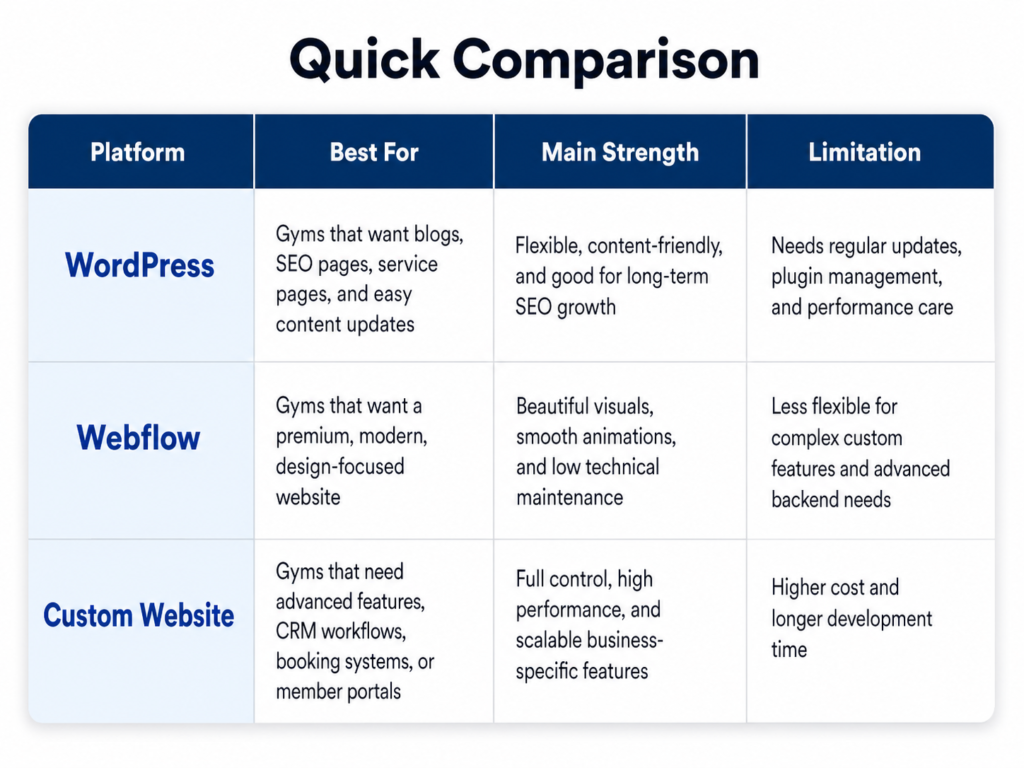
Quick Comparison
WordPress is best for SEO, blogs, content management, and flexible growth.
Webflow is best for premium design, smooth visuals, and modern landing pages.
Custom development is best for advanced features, performance, scalability, and full business-specific control.
Which One Should Gym Owners Choose?
If you are a small local gym and want a practical website with blogs, SEO, service pages, and lead forms, WordPress is usually the best starting point.
If you run a premium fitness studio and want your website to look modern, stylish, and high-end, Webflow can be a great choice.
If you want a serious digital growth system with CRM integration, custom booking, member portals, automation, landing pages, and scalable performance, a custom gym website is the strongest option.
Final Recommendation
For most gym owners, the best choice depends on the stage of the business.
A new or growing gym can start with a well-built WordPress website.
A premium fitness brand can choose Webflow for a stronger design experience.
An ambitious gym owner who wants to take marketing to the next level should consider a custom-built website designed around leads, automation, SEO, and long-term growth.
Your website should not just exist online. It should help your gym attract visitors, convert leads, and grow memberships.